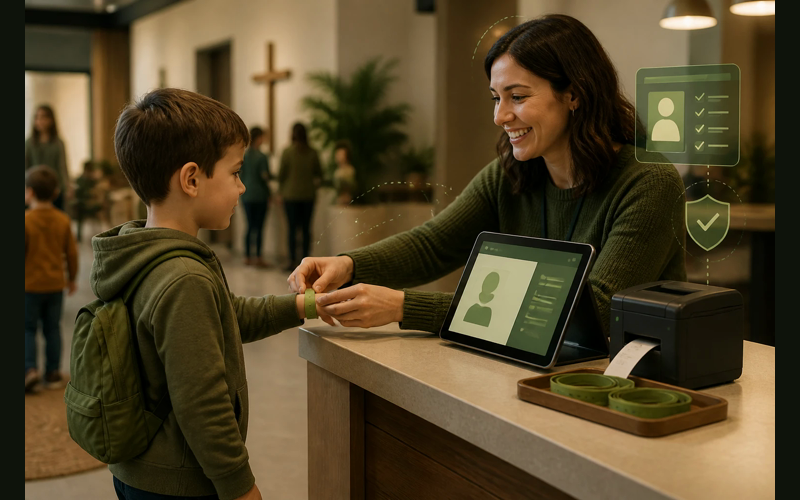
A mother drops off her four-year-old in the children’s ministry room. She writes his name on a sticky note, presses it onto his shirt, and heads into the service. There is no matching tag for pickup. No record of who dropped him off. No way to reach her if something goes wrong. If someone she didn’t authorize tried to take her son after the service, the only safeguard would be a volunteer’s memory of a face they saw for thirty seconds an hour ago.
This happens in churches every Sunday. Not because anyone is careless, but because the system in place was designed for a world with fewer concerns and smaller stakes. Most churches that still rely on sign-in sheets or sticky-name-tag systems aren’t being negligent. They just haven’t had a reason to rethink the process. Until they do.
Check-in is one of those operational details that feels administrative until something goes wrong. Then it feels like the most important thing you never prioritized.
More than a name tag
When most of us hear “check-in system,” we think about the iPad station in the children’s ministry hallway. That’s part of it. But the reason check-in matters goes well beyond printing labels.
A functioning check-in system does at least four things at once. It creates a chain of custody for every child in your care. It generates attendance data you can actually use. It gives you a way to identify and follow up with first-time visitors. And it builds accountability into your volunteer teams.
Each of those functions sounds routine on paper. In practice, they represent the difference between a church that knows what’s happening on a Sunday morning and one that’s guessing.
Consider the safety dimension alone. When a parent checks in their child through a digital system, both the parent and the child receive matching security codes. At pickup, those codes have to match. If a child has an allergy, that information prints on the label and stays visible to every volunteer in the room. If there’s a custody situation, the system flags it before the wrong person reaches the door.
None of that is possible with a clipboard.
Attendance data that actually tells you something
Churches track attendance for all kinds of reasons, but the most common approach is a headcount. Someone stands in the back and estimates. Maybe they click a counter. The number goes in a spreadsheet or gets mentioned in a staff meeting. And that’s where the usefulness ends.
Digital check-in changes what attendance data can do. Instead of knowing that 147 people showed up last Sunday, you know which 147 people showed up. You know who has been present three weeks in a row after being absent for six months. You know which small group members are also serving on Sunday mornings. You know which families attend the early service and which ones come late.
That kind of specificity turns attendance from a vanity metric into a pastoral tool. When you can see that a family who attended every week for two years has missed the last three Sundays, that’s a signal. Not an alarm, but a prompt. Something to pay attention to. Something a pastor with a congregation of 150 people cannot reasonably track in their head.
The data doesn’t replace relational awareness. It supports it. And for pastors who carry the weight of knowing their people, having a system that helps them notice patterns is not a luxury. It is a form of care.
Visitor tracking without the awkwardness
Most churches want to follow up with first-time visitors. Few churches do it well. The gap usually isn’t desire or willingness. It’s information.
If a visitor fills out a connection card, someone has to collect it, read the handwriting, enter the data somewhere, and then initiate contact before too many days pass. Every step in that chain is a place where follow-up dies. The card gets lost. The handwriting is unreadable. The data goes into a notebook that no one checks. The follow-up call happens eight days later, and the moment has passed.
A check-in system captures visitor information at the front end of the process. When a first-time family checks their children into the kids’ area, you already have their name, phone number, and the ages of their children. You know they visited. You know when. And that information lives in a system that can remind you to follow up on Monday, not whenever someone remembers.
This isn’t about being aggressive with outreach. It’s about being reliable. A visitor who takes the step of walking into your church for the first time deserves to be noticed. Not with a spotlight, but with a follow-up that says, “We’re glad you came, and we paid attention.”
Volunteer accountability and protection
Volunteers are the backbone of children’s ministry, student ministry, and most Sunday operations. We trust them deeply, and that trust is well-placed in the vast majority of cases. But trust without structure leaves both the children and the volunteers exposed.
A check-in system creates a record of which volunteers were present in which rooms at which times. If a concern arises, whether it’s a parent’s question or something more serious, there’s documentation. That documentation protects the church, protects the families, and protects the volunteers themselves.
It also creates practical accountability for volunteer attendance. When you can see that a volunteer has been absent three out of the last four weeks, you can have a conversation before you’re scrambling to find coverage on a Sunday morning. You can identify volunteers who are burning out because they’ve served every single week for six months without a break.
Volunteer care and volunteer accountability aren’t competing priorities. They’re the same priority, approached from two directions. A good check-in system supports both.
What this looks like at different church sizes
The right approach to check-in depends on your context. A church of 50 has different needs and different resources than a church of 300. The principle is the same, but the implementation should match where you actually are, not where you hope to be in five years.
Churches under 75
At this size, you know almost everyone by name. The temptation is to skip check-in entirely because it feels unnecessary. Everyone knows which kids belong to which parents. Formality feels like overkill.
The case for a simple check-in system at this size isn’t complexity. It’s documentation. Even in a small, tight-knit congregation, having a record of who was present matters for insurance, for liability, and for the kind of basic child safety that protects you if something unexpected happens.
A single tablet running a free or low-cost check-in app is enough. You don’t need a kiosk, a label printer, or a dedicated check-in team. You need a digital record that replaces the clipboard. Planning Center offers a free tier that handles up to 10 daily check-ins, which may cover a church this size. If you need more capacity, their paid plans start at $15 per month.
Churches of 75 to 200
This is the range where check-in stops being optional and starts being operationally necessary. You’re too large for every volunteer to know every family, but you’re too small to staff a dedicated operations team. The system has to do work that people used to do intuitively.
At this size, a label printer becomes genuinely useful. Matching security labels for parents and children add a layer of safety that matters when your children’s area has 20 or 30 kids on a Sunday morning. Attendance tracking becomes valuable for pastoral care because you can no longer keep mental tabs on everyone.
Breeze (now part of the Tithely platform) includes check-in as part of its church management system, starting at $72 per month for the full suite. That means your check-in data lives in the same place as your member database, your giving records, and your communication tools. For a church in this range, having everything in one system matters because you probably don’t have the staff to manage multiple platforms.
Planning Center’s Check-Ins module works well here too, especially if you’re already using other parts of the Planning Center ecosystem. Their pricing scales with your actual check-in volume, so you’re paying for what you use.
Churches of 200 and above
At this size, check-in is infrastructure. You likely have multiple services, multiple children’s ministry rooms, and enough weekend traffic that a disorganized check-in process creates a visible bottleneck. Parents notice when it takes eight minutes to drop off their kids. Volunteers notice when they can’t tell which children are supposed to be in their room.
The considerations here shift toward throughput and integration. Multiple check-in stations. Self-check-in options where parents can handle the process on their own phone before they arrive. Real-time room capacity tracking so volunteers know when a classroom is full. Emergency notification systems that can text a parent during the service if their child needs them.
Both Breeze and Planning Center handle this scale. Planning Center’s Check-Ins module supports multiple stations, custom security labels, and real-time attendance dashboards. Breeze integrates check-in with the rest of its management tools, which reduces the number of systems your team has to learn and maintain.
The key at this size isn’t choosing the most powerful option. It’s choosing the one your team will use consistently. A sophisticated system that frustrates your volunteers accomplishes less than a simpler one they trust.
The real implementation details nobody talks about
Choosing a platform is the easy part. Getting your church to actually use it is where the work happens. A few things we’ve seen make the difference between a check-in system that sticks and one that gets abandoned after a month.
Start with children’s ministry only. The highest-stakes, most obvious use case. Parents understand why their kids need to be checked in. Volunteers understand why security labels matter. You don’t have to sell anyone on the concept. Once the process is running smoothly in children’s ministry, expanding to student ministry, volunteer tracking, or general attendance is a natural next step.
Train the trainers, not the crowd. You don’t need every parent to understand the system before launch day. You need three or four volunteers who can stand at the check-in station and walk families through it. Most parents will figure it out after their second visit. The volunteers who greet them on their first visit are the ones who need to be confident.
Buy the label printer. This is a small investment that makes a disproportionate difference. A printed label with a security code, the child’s name, allergy information, and a matching parent tag does more for your children’s ministry credibility than almost any other single change. Brother and Dymo both make compatible printers in the $50 to $150 range. Both Breeze and Planning Center support them.
Expect the first two Sundays to be slower. Any new process adds friction before it removes it. Let your congregation know in advance that check-in is changing and that the first couple of weeks might take an extra minute or two. Most people will be patient if they understand why you’re making the change. Frame it around child safety, and you’ll find that parents are your biggest advocates.
Don’t over-engineer it. The first version of your check-in process should be simple. One station. One printer. One volunteer helping families. As your team gets comfortable, you can add self-check-in options, pre-registration through a church app, or additional stations in the lobby. Getting the basics right matters more than launching with every feature turned on.
Why this is a stewardship conversation
Every Sunday, families entrust their children to the care of your church. That’s an act of faith, both in God and in the community they’ve chosen to be part of. The systems we put in place to honor that trust aren’t just operational decisions. They’re statements about what we take seriously.
A church that invests in a thoughtful check-in process is saying something to its families. Not through words, but through action. It’s saying: we know who is here. We know where your children are. We have a plan if something goes wrong. And we care enough about the details to build a system that works.
That tangleage doesn’t require a large budget or a dedicated staff. It requires the willingness to treat the safety and tracking of the people who walk through your doors as something worth doing well.
The clipboard worked for a long time. It served its purpose. But the expectations of families, the realities of child safety, and the opportunities that good data creates have all moved past what a sign-in sheet can deliver. Meeting those expectations isn’t about keeping up with larger churches. It’s about being faithful with the responsibility you already carry.
The tools are accessible. The costs are manageable. The learning curve is shorter than most people expect. The only question is whether we’re willing to treat check-in as what it actually is: one of the most practical ways we care for the families in our community every single week.


Recent Posts
-
 “Broadcast” was a farming word first, and it changes how you read Matthew 13
 -
 What broadcasting actually looks like in an ordinary week
 -
 The one ChMS report that tells you if people are actually connecting
 -
 Breeze vs ChurchTrac: Which One Fits a Smaller Church Better?
 -
 How to evaluate church management software for your size church