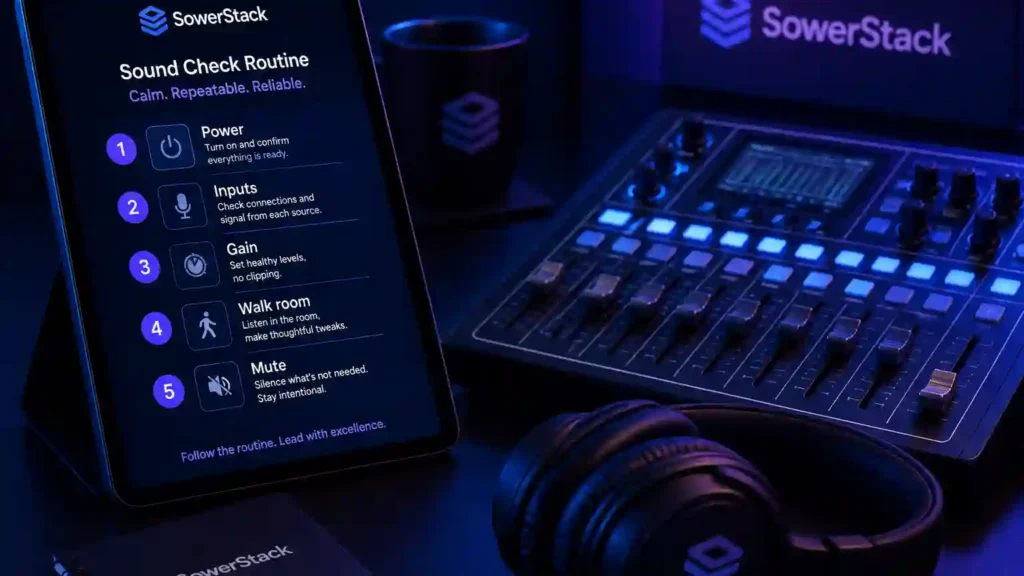
The first people to notice a weak sound check are usually not the people sitting in the room. It is the person behind the board, the worship leader trying to hear the first note, and the pastor who looks down at a wireless pack and wonders whether the light is supposed to be blinking red.
Most Sunday audio problems do not begin during the service. They begin before anyone arrives, when the routine is unclear, the batteries have not been checked, and the first real test of the system happens in front of the church. The service may still move forward, and most people may be gracious about it, but the room carries a low level of distraction that did not need to be there.
A sound check is not about making technology impressive. It is about helping the technology disappear so the church can sing, listen, pray, and respond without unnecessary friction. That is a ministry concern before it is a technical concern.
You do not need a complicated audio department to build a better routine. You need a sequence that a trained volunteer can follow calmly, even on a Sunday when someone is sick, the schedule changes, or a microphone gets moved during the week. A dependable sound check protects the service from preventable confusion.
Start with enough quiet time
A calm sound check sequence
A sound check needs a quiet window before musicians arrive, before people begin conversations in the room, and before the pressure of the morning starts making every small problem feel larger than it is. If the worship team arrives at 8:00 for a 9:30 service, the person opening the audio system should usually arrive closer to 7:30.
That margin is not idle time. It gives you space to turn the system on correctly, walk the room, check obvious issues, and prepare the board before anyone asks for a monitor change. Without that margin, the first twenty minutes of rehearsal become a troubleshooting session.
Quiet time also helps volunteers learn the system. A newer sound tech can read labels, compare the board to the stage, and ask better questions when the room is not already moving at Sunday speed. That kind of learning is hard to do while a vocalist is waiting and someone is asking whether the livestream has audio.
Set the expectation gently. If you serve with volunteers, do not present early arrival as proof of spiritual maturity. Present it as part of caring for the people in the room. A little margin before service often gives everyone else more peace during service.
Power the system in the right order
The first practical habit is a consistent power sequence. Turn on signal sources and control equipment before you turn on amplification. In most rooms that means the sound board or digital console comes on first, then any audio processors, then amplifiers or powered speakers last.
The reason is simple. Speakers should not be awake while the rest of the system is sending startup noise through the chain. Loud pops are hard on equipment, and they can startle anyone working near the stage. A steady sequence prevents a problem before it has a chance to become visible.
When you shut the system down, reverse the order. Turn off amplifiers or powered speakers first. Then turn off processors and the board. If your church uses a power sequencer, keep the same principle in mind so you understand what it is doing for you.
Write this order down and keep it near the booth. A volunteer should not need to remember the correct order from memory at the end of a long morning. Written routines are not a sign that people are forgetful. They are a sign that the work matters enough to make it repeatable.
Walk the stage before touching the board
A three-minute stage walk catches problems that look mysterious from the booth. Check each cable connection by sight and touch. Confirm that microphones are in the right stands, instrument cables are not strained, and monitor wedges still point toward the people who need to hear them.
This is also the time to notice what changed during the week. A music stand may have been moved in front of a microphone. A cable may have been unplugged for a midweek event. A monitor may be aimed at a person’s knees because someone cleaned the stage and put it back quickly.
Do not treat the stage as if it should remain untouched from Sunday to Sunday. Churches use their rooms. People move things. That is normal. The sound check exists partly because ministry spaces are living spaces, not controlled labs.
Battery checks belong in this stage walk. Check every wireless handheld and lapel mic. Include headset packs and active instruments in the same pass. Each one should have enough battery life for the full service. If a battery reads low, replace it before the service. Waiting to see whether it lasts is not stewardship. It is gambling with the most visible part of the morning.
→
Stage walk
→
Channel check
→
Monitor mix
→
Room listen
Keep the order visible so the routine does not depend on one person’s memory.
Check one channel at a time
The heart of the sound check is not the full band run-through. It is the patient channel-by-channel check that happens before the full mix begins. Each microphone and instrument should prove that it reaches the board clearly before it becomes part of the service.
Start with the first active input. Ask the person using that microphone or instrument to speak or play at the level they will use during service. Watch the input meter. You are looking for healthy signal without clipping. On many digital consoles, peaks around minus eighteen to minus twelve decibels are a good starting point.
Set gain before you set fader position. Gain controls how much signal enters the board. The fader controls how much of that prepared signal goes into the mix. If gain is too low, you may raise the fader and bring up unnecessary noise. If gain is too high, the signal may distort before the fader can help.
After gain, confirm routing. Make sure the channel is going to the main mix if it needs to be heard in the room. Confirm whether it needs to reach a monitor, a livestream feed, a recording device, or a hearing assistance system. A channel can meter beautifully and still be absent from the place it needs to serve.
Then make modest EQ decisions. A high-pass filter on vocal mics can reduce low rumble that does not help speech or singing. Avoid shaping every channel aggressively during the first pass. The goal is a clean and dependable starting point, not a perfect studio mix.
Move through the board slowly enough to avoid guessing. Mute unused channels. Label anything that has changed. If your board can save scenes, save a Sunday starting scene after the system is checked. If your board is analog, take a photo of useful settings when the mix is stable.
Build monitor mixes before the room mix
Musicians who cannot hear well will compensate with volume, and that compensation usually makes the whole room harder to mix. A singer pushes harder. A guitarist turns up an amp. A drummer plays with more force because the musical center feels unclear.
Good monitor setup helps the people leading music serve the room with confidence. Ask each person what they need to hear, then build the mix gradually. Start lower than you think you need. It is easier to add a little volume than to calm a stage that has already become too loud.
If you use floor wedges, listen from the musician’s position. The sound at the booth is not the sound six feet in front of a wedge. A monitor may be loud at knee level and still unclear at ear level. Aim it toward the person’s head, not toward their shoes.
If you use in-ear monitors, confirm that each pack receives the correct mix. Check batteries and cable connections. Make sure the person wearing the pack knows how to adjust their own level safely. In-ear systems can serve a church well, but they require clear habits because mistakes can feel more personal to the person wearing them.
Protect the room from feedback during monitor setup. Keep vocal microphones behind the monitor’s rejection zone when possible. Do not aim a wedge into the sensitive side of a microphone. Small placement changes often solve problems that no amount of frantic EQ can fix.
Set the main mix for people in the room
The main mix should support congregational singing and spoken word clarity. Begin with the musical foundation, then add other instruments and vocals in a way that makes the words easy to hear. Do not let the room mix become a contest between channels.
Walk the room while music is happening. The booth is only one listening position, and it is not always the best one. Stand near the back. Sit in the middle. Listen near the side where reflections may gather. You are not trying to make every seat identical. You are trying to make the whole room reasonably clear.
Use volume as a tool, not as a substitute for clarity. If people cannot understand the lyric or the sermon, more volume may only make the problem larger. Muddy sound often needs less low-mid energy, better microphone technique, or a quieter stage before it needs more overall level.
A simple phone decibel app can give you a reference point, even if it is not laboratory accurate. It helps volunteers learn what a normal Sunday level feels like and keeps the mix from drifting over time. Numbers are not the final authority, but they can keep the room honest.
Check the sermon mic like it matters
The pastor’s microphone deserves its own focused check because spoken word clarity carries so much of the service. A sermon mic may sound fine when someone taps it or says a quick phrase, then become thin, boomy, or noisy when the pastor speaks naturally for thirty minutes.
Have the person using the mic speak at sermon volume if possible. If that person is not available, choose someone with a similar speaking level and posture. Check placement carefully. A lapel mic clipped too low can sound distant. A headset element placed directly in front of the mouth can catch breath noise and plosives.
Confirm that the sermon mic reaches every place it needs to go. The room, livestream, recording, assisted listening, and lobby feed may not share the same path. A Sunday message can continue serving people after the service, but only if the audio is captured clearly.
Make a note of the pastor’s normal settings. If the same person preaches most weeks, this becomes part of your church’s audio memory. New volunteers should not have to rediscover basic sermon settings every Sunday.
Listen to the livestream and recording separately
The livestream or recording feed is not the same as the room mix. The room has natural acoustic energy. Online listeners only hear what the feed gives them. If that feed is thin, distorted, or missing key channels, the online experience will not reflect what happened in the room.
Check the stream on a separate device when possible. Use headphones or a small speaker in another room. Make sure the vocal is present, the sermon mic is clear, and the overall level is not clipping. Confirm that the encoder or streaming software receives signal before the service begins.
Storage and connection checks are part of the routine. A memory card that is nearly full can fail mid-sermon. An unstable internet connection can turn a clear service into broken fragments for someone trying to watch from home. These checks are not glamorous, but they protect people who are relying on the digital doorway.
If your church cannot run a separate stream mix, do the best you can with what you have. A post-fader auxiliary send, a simple room microphone blended carefully, or a modest recording setup can still serve people well when the process is consistent.
Run one full song before service
A full song reveals issues that isolated channel checks cannot reveal. Balance, monitor comfort, transitions, feedback risk, and stage volume all become clearer when everyone plays together from start to finish.
Do not stop after the first verse unless there is a real problem. Let the song move through its normal dynamics. Listen for how the mix changes when the song builds and when it quiets down. A mix that works in the first thirty seconds may need adjustment when the whole group enters.
After the run-through, make final notes. Save a scene if your board allows it. Write down anything unusual about that Sunday, such as a guest musician, a different sermon mic, or a video feed that needs audio. Notes turn experience into a shared system.
Leave time for silence before the service begins. The sound tech should not still be chasing routine problems while people gather to pray. A calm booth often helps create a calm room.
Make the checklist small enough to use
A checklist that is too long will eventually be ignored. A useful Sunday checklist fits on one page and covers the order of operations, the most common failures, and the final confirmation points. It should guide the volunteer without burying them.
Include the power sequence and the stage walk. Add battery checks and channel checks. Add monitor setup and room listening as separate lines. Include sermon mic setup and stream checks. Put shutdown order in its own place. Leave a small space for notes. Keep the language plain enough that a trained beginner can follow it.
Review the checklist after a few Sundays. If a recurring problem is not addressed, add one line. If a step never matters in your room, remove it. The goal is not to preserve a document. The goal is to build a dependable habit.
Train volunteers around the checklist, not around one person’s instincts. Invite newer volunteers to shadow someone experienced, then let them run parts of the routine while the experienced person watches. Confidence grows when people know what they are supposed to do next.
A good sound check is pastoral stewardship
Clear audio will not make a church faithful by itself. It will not replace prayer, preaching, hospitality, or discipleship. It simply removes preventable friction from the moments when people are trying to hear and respond.
That is why the routine matters. A working microphone helps the timid reader be heard. A clear monitor mix helps the worship leader serve without strain. A clean sermon recording helps someone revisit the message later in the week. These are ordinary details, but ordinary details often carry real ministry weight.
You may not have expensive equipment or a trained engineer. You may have a small room, a donated board, and a rotating group of faithful volunteers. That is enough to begin. Start with a written sequence. Practice it every week. Improve it when you learn something.
Faithful systems do not have to be complicated. They have to be clear enough to repeat and humble enough to improve. A good sound check is one of those systems.
If your church is trying to make Sunday communication clearer with the tools you already have, we can help you think through the system before you buy another piece of gear.


Recent Posts
-
 “Broadcast” was a farming word first, and it changes how you read Matthew 13
 -
 What broadcasting actually looks like in an ordinary week
 -
 The one ChMS report that tells you if people are actually connecting
 -
 Breeze vs ChurchTrac: Which One Fits a Smaller Church Better?
 -
 How to evaluate church management software for your size church